


Description
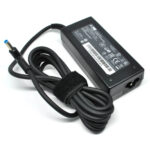
Acer Laptop Charger (19V, 3.42A) – Reliable Power for Your Acer Devices
If you’re looking for a high-quality replacement or backup power adapter, the Acer Laptop Charger 19V 3.42A is the perfect solution. Designed to match the original specifications of your Acer laptop, this charger delivers stable, efficient, and safe power, ensuring that your device stays charged and ready for productivity, entertainment, or study. Whether you’ve lost your original adapter or need a second one for convenience, this charger is an ideal fit.
⚡ Product Overview
The Acer Laptop Charger (19V 3.42A) is compatible with a wide range of Acer laptop models, including popular series like Aspire, TravelMate, Extensa, Swift, and others. This adapter outputs 19 volts and 3.42 amps, providing 65 watts of power — the optimal specification for most Acer laptops. With a 5.5mm x 1.7mm connector, it’s designed for a perfect fit, offering both plug-and-play simplicity and dependable performance.

Key Specifications:
-
Input: 100-240V ~ 1.5A, 50/60Hz (worldwide voltage compatibility)
-
Output: 19V, 3.42A
-
Power: 65W
-
Connector size: 5.5mm x 1.7mm
-
Cable length: Approx. 1.2 meters (adapter to laptop)
-
Condition: Brand new, high-quality replacement
🔌 Compatible Acer Laptop Models
This Acer 65W charger supports a wide range of laptops. It works seamlessly with the following models and series:
-
Acer Aspire Series (e.g., Aspire 5, Aspire 3, Aspire E1, E5, ES1, V5, V3)
-
Acer TravelMate Series (e.g., TravelMate B, P2, P4)
-
Acer Extensa Series (e.g., Extensa 2509, 2510)
-
Acer Swift Series (certain models)
-
Acer Chromebook Series (select 65W-compatible models)
Note: Please check your current adapter or laptop label for output requirements (19V 3.42A, 65W) and connector size (5.5mm x 1.7mm) before purchasing.
✅ Features & Benefits
1. High-Quality Build
Manufactured with premium-grade components, this Acer adapter is designed to last. It includes high-temperature resistant materials, a robust outer casing, and quality internal circuitry.
2. Safe Charging
The Acer laptop charger 19V 3.42A comes with built-in protections against overvoltage, overcurrent, overheating, and short circuits, ensuring safe and reliable charging every time.
3. Efficient Power Delivery
Enjoy fast and stable charging without overheating or fluctuations. This adapter uses smart IC technology for efficient energy transfer that protects your battery over time.
4. Compact & Travel-Friendly
Its lightweight and portable design make it easy to carry in your laptop bag or backpack, making it an ideal travel companion for work, study, or leisure trips.
5. OEM Compatibility
This adapter is 100% compatible with original Acer adapters that share the 19V 3.42A 65W specification. It’s also an excellent alternative to the Acer ADP-65JH, PA-1650-86, and PA-1650-02 series adapters.
🛠️ How to Identify the Right Charger
To ensure compatibility, check these 3 key details on your current Acer charger or laptop:
-
Output Voltage & Current: Look for 19V and 3.42A. This means your charger outputs 19 volts and 3.42 amps — totaling 65W of power.
-
Connector Tip Size: Measure or look for the tip size — this one is 5.5mm outer diameter x 1.7mm inner diameter.
-
Model Compatibility: Verify your laptop model against the supported list or cross-check the part number (e.g., ADP-65JH, PA-1650-02, etc.).
💼 Ideal for Home, Office & On-the-Go Use
Whether you’re a student, professional, or casual user, the Acer Laptop Charger (19V 3.42A) offers the convenience and peace of mind you need. It’s an excellent choice if:
-
You lost your original charger
-
Your old charger is damaged or faulty
-
You want a second adapter for home or travel
-
You’re setting up a charging station at work or in a shared office
With this reliable power source, your Acer laptop will always be charged and ready.
🔧 Troubleshooting & Tips
If Your Laptop Isn’t Charging:
-
Ensure the connector fits snugly in the charging port
-
Confirm your laptop accepts 19V 3.42A input
-
Check the wall socket and power cord for damage
-
Try restarting the laptop while plugged in
-
Look for signs of wear in the charger cable
Charger Care Tips:
-
Avoid wrapping the cable too tightly
-
Keep the adapter away from moisture
-
Unplug when not in use to prevent overheating
-
Use a surge protector for added safety


Reviews
There are no reviews yet.